Everything You Need To Know About Canva: (Detailed Overview)

Canva Inc. is an Australian software company that provides a graphic design platform for making presentations and graphics. There are so many ready-made templates available to users, and the platform has both free and paid versions. If someone wants to pay, they can take Canva Pro or Canva Enterprise; these are mainly for additional features. In this article, you will get to learn about the company behind this graphic design tool.
Company Overview

Here is the basic information about Canva Inc.
Company Details
| Company Details | Information |
| Company Name | Canva Pty Ltd |
| Founded | 2013 |
| Founders | Melanie Perkins, Cameron Adams, Cliff Obrecht |
| Industry | Software, Graphic Design |
| Type | Graphic Design Software |
| Headquarters | Sydney, Australia |
| Area Served | Worldwide |
| Products | Canva Photo Editor, Canva Video Editor, Canva Websites |
| Employee Number | Approximately 5,500 |
| Revenue | Approximately $4 Billion |
| Company Valuation | $42 Billion |
| Users | It has over 265 million content-creating users (across 190 countries) and more than 31 million paying customers, and it serves 95% of the companies on the Fortune 500 list. |
| Official Website | www.canva.com |
What Is Canva?
In 2013, Canva Pty Ltd released its graphic design software named Canva. From basic design to professional design, there are a lot of things that you can do with this platform. Also, there are both free and paid options. Obviously, you will get a limited amount of features with the free version, but you must know there are plenty of options.
The company claims that there are more than 265 million monthly active users worldwide who regularly use this software. If someone wants physical products shipped, then they can also order. When the company started, there were around 750,000 users. After that, the company hired Guy Kawasaki. Canva for Work was launched in 2015. The focus was on marketing materials.
Company History

Melaine Perkins, Cameron Adams, and Cliff Obrecht founded Canva in the year 2013 in Perth, Australia. In the first year, the platform had a total of 750,000 users. Within a couple of years, the company’s revenue increased to $23.5 million from $6.8 million. Before 2017, the company was at a loss. From 2017, the company took its first step in profitability. There were around 294,000 users who were paid subscribers.
In the year 2018, the company raised its funds. Sequoia Capital, Felicis Ventures, and Blackbird Ventures funded the company, and there was a raise of $40 million. Furthermore, the valuation of the company increased to $1 billion for the first time.
After one year, the company again raised its funds to $70 million. The main investors were Felicis Ventures, Blackbird Ventures, General Catalyst, and Bond. The valuation was $1 billion in 2018, and in 2019, the valuation went to $2.5 billion. In the same year, there was another raise of $85 million. The valuation increased to $3.2 billion. This was the time the company released an enterprise product for the first time.
Canva Education was launched in 2019. This was basically a free product for students, schools, and any type of educational institution. With the help of Canva for Education, there is a bridge that connects students and teachers.
In 2020, Canva signed a contract with FedEx Office. After one month, Canva again announced that they were going to be partnered with Office Depot. In the middle of 220, Canva’s valuation reached $6 billion. And within one year, the valuation of the company grew to $40 billion. This happened in September 2021. The founders of the company said that they were going to give their fortunes to several philanthropic causes.
Data Breaches
In the successful nine-year journey, Canva had to face a terrible data breach. In May 2019, there were around 139 million data was hacked and breached. The exposed data contained names, email addresses, usernames, demographic locations, password hashes, and many more. Of this incident, Canva had to face so many criticisms.
There was another incident where Canva showed its callousness. In 2020, around 4 million passwords were decrypted and leaked online. The responsibility for the incident was fully taken by Canva. The company mentioned that this incident happened because the users hadn’t changed their passwords since the first breach.
Acquisitions
From the first day, the company showed a tremendous amount of success. To expand the company, Canva acquired Zeetings, a presentations startup. This is because Canva wanted to expand the presentation space. Later that year, the company announced that they were going to acquire Pexels and Pixabay. Then they also acquired two stock photography websites which were based in Germany. In 2021, Canva bought Kaleido.ai, an Australian startup, and Smartmockups, a Czech-based company.

Canva, A Successful Startup
Canva is one of those successful startups that has gained users worldwide within a limited time period. Canva’s co-founders have amassed almost $10 billion in net worth combined – which is shocking! What’s even more shocking is that the co-founder, Cliff Obrecht, has said that being a billionaire is “not our vibe.”
Although they heavily rely on funding from the US, Canva has been able to generate great returns. Currently, they have more than 265 monthly active users and earn $4 billion in Annual Recurring Revenue (ARR).
Canva Graphic Designing Tool
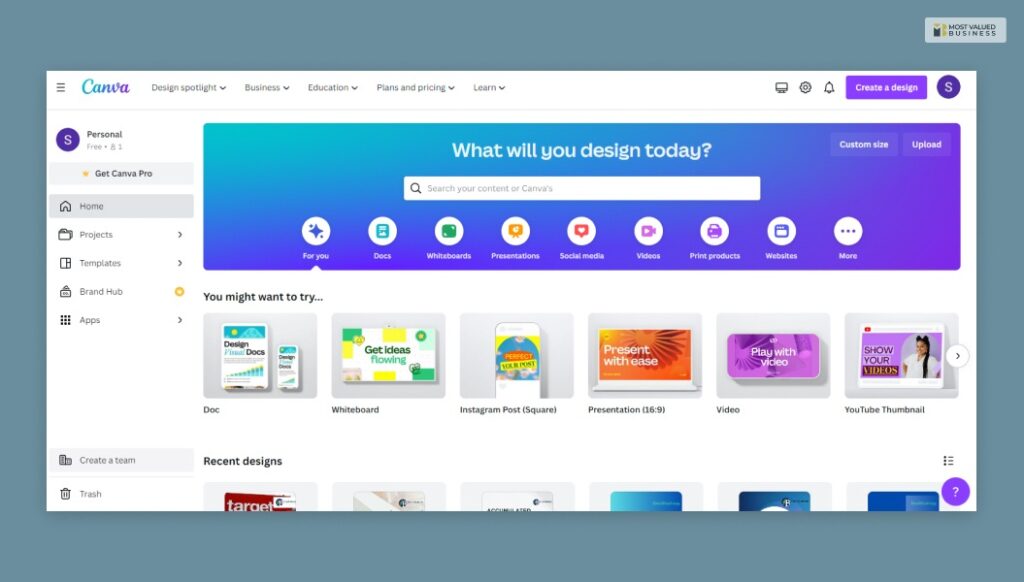
Whether you are making a marketing presentation or a unique image for a blog post, Canva is an all-rounder tool worthy of use. The tool is widely used among graphic designers and creators from different sectors. Here are some features of Canva. You can use this tool for both personal and professional use.
- Convert your videos into MP4 format with ease.
- Do you like to mix photos and make a photomontage? Well, this is your tool, then.
- The tool comes with a variety of filters.
- Use different sound effects in your videos to make them more vibrant.
- You can use this tool to create video transitions.
- Try an Image enhancer.
Canva & AI: It’s Not Just a Design Tool Anymore
Canva has gone all-in on AI. And honestly? It shows. The Magic Studio suite brings together a bunch of powerful AI tools that make designing faster, smarter, and way more accessible, even if you’ve never touched a design tool in your life. Here’s what you’re working with:
- Magic Studio: Canva’s all-in-one AI hub that pulls together every smart tool in one place. You access AI-powered design, writing, and editing features without switching between apps or platforms.
- AI Productivity: Canva’s AI cuts down your design time dramatically. It automates repetitive tasks, suggests layouts, and helps you produce more polished output in far less time than traditional design workflows.
- AI Presentations: You type a topic, and Canva builds a full presentation for you. Slides, structure, visuals, all generated automatically. It’s honestly a game-changer for anyone who dreads building decks from scratch.
- AI Image Generation: Describe what you want, and Canva generates it. No stock photo hunting, no licensing headaches. Just type a prompt and get a unique, ready-to-use visual in seconds.
- AI Writing: Struggling with captions, headlines, or body copy? Canva’s AI writing tool generates on-brand text suggestions directly inside your design. You write less, create more.
- AI Editing: Remove backgrounds, erase unwanted objects, resize designs for different platforms, all with one click. Canva’s AI editing tools handle the technical stuff so you can focus on the creative part.
New Features of Canva: Builds Are Getting Bigger
Canva isn’t just for social media posts anymore. The platform has expanded into full-blown web and video territory, and these new features are genuinely impressive. Let’s talk about three that stand out.
A. Canva Websites
You can now build and publish a fully functional website directly inside Canva. No coding, no third-party tools. Just drag, drop, and go live. It’s perfect for portfolios, small business pages, event sites, or anyone who needs a clean web presence fast, without touching a line of code.
B. Canva Codes
This one’s genuinely impressive. Canva Code is an AI-powered interactive builder to generate codes. You describe what you need, like a pricing calculator, a quiz, a countdown timer, and it builds it. Just prompt and create seamless working web apps and UI designs for your business. Just like that.
C. Video Background Remover
This one’s a big deal for content creators. Canva’s video background remover strips out backgrounds from video clips automatically, no green screen needed. It saves hours of manual editing and opens up a ton of creative possibilities for social media content, product videos, and branded storytelling.
Why Canva Tops Among Its Competitors
There are plenty of design tools out there. So why does Canva keep winning? It’s not just the templates. Here’s what actually sets it apart.
- Ease of Use That Actually Means Something: Most “easy” tools still have a learning curve. Canva genuinely doesn’t. You open it, pick a template, and start creating within minutes. No tutorials needed. No design background required. That accessibility is hard to beat.
- An Ecosystem, Not Just a Tool: Canva isn’t one feature; it’s an entire creative suite. Presentations, websites, video editing, AI writing, social media content, print products, it’s all under one roof. Competitors offer pieces of this. Canva offers the whole package.
- Free Version That’s Actually Usable: A lot of tools lock their best stuff behind a paywall immediately. Canva’s free tier is genuinely functional. You get thousands of templates, solid editing tools, and real creative freedom without spending a rupee.
- Constantly Evolving With AI: Canva isn’t sitting still. The Magic Studio rollout, AI image generation, smart editing tools- the platform keeps adding features that matter. Competitors are playing catch-up while Canva keeps moving forward.
Frequently Asked Questions (FAQs):
Here are some questions and answers that you may find interesting.
Ans: Most people use Canva for designing and presenting. But there are a lot of features that people can use in Canva. Here are the main features of Canva.
1. Presentations Editor
2. Social Media Editor
3. Video Recorder
4. Canva Docs
5. Canva Sheets
6. Image enhancer
7. Canva Website
8. Printable Design Editor
Ans: One of the main reasons that makes Canva so popular is that it is very simple and easy to use. If you have no idea about graphics and designing, don’t worry; Canva is the right place for you. You can start from scratch. There are a lot of templates that you can use and choose from. Also, you will find multiple features and categories to work with.
Ans: You need to understand that Canva is one of the basic tools that people use for designs and presentations. Canva offers so many templates, and you can make those also. But there are alternatives where you will find so many new features.
1. PicMonkey
2. Stencil
3. Crello
4. Snappa
5. Easil
6. Design Wizard
7. Adobe Spark
8. Visme
Final Words
Canva is one of the most successful companies that provides brilliant graphic services to people who have zero ideas and experience in graphics and design. From social media influencers to professional designers, they can make basic designs, presentations, and social media posts as well. All you need to do is log in to Canva and start working.
Read More:
tags
Sudarshan Nath
Sudarshan Nath, a results-driven SEO professional with over 8 years of experience in search engine optimization, digital strategy, and online marketing. He drives organic growth through data-backed strategies and technical SEO expertise. He holds an MBA in Digital Marketing from Amity University Noida and excels in creating data-driven strategies that drive results. Sudarshan Nath has a proven track record of helping businesses grow their online presence and achieve their marketing goals. LinkedIn