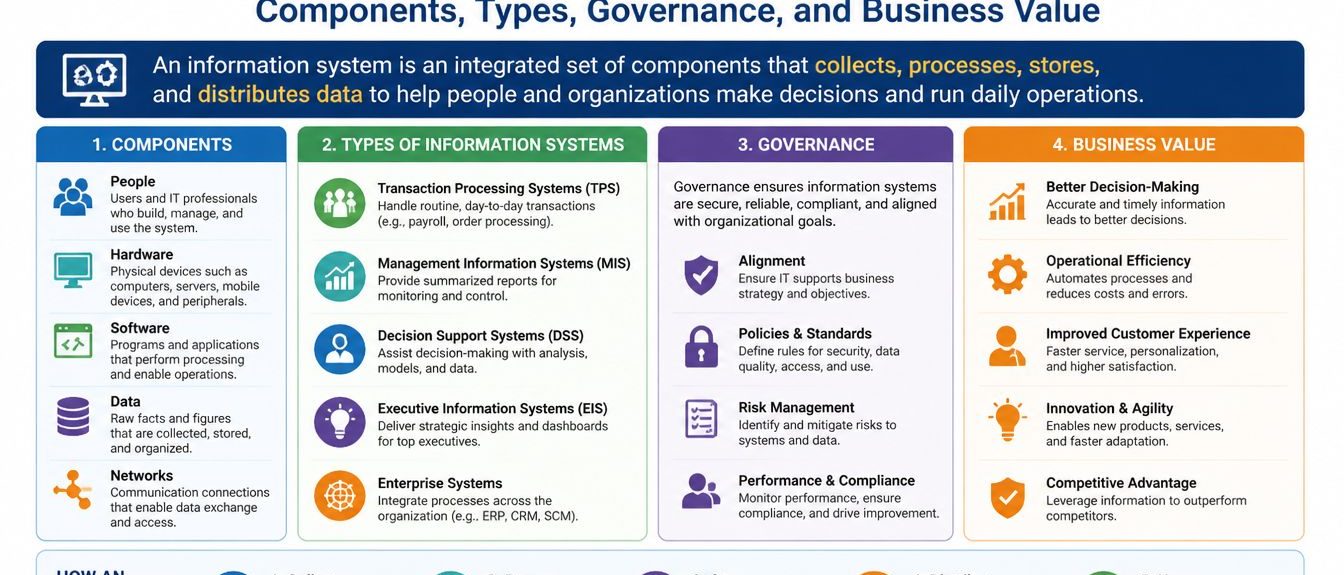
Information Systems Explained: Components, Types, Governance, and Business Value

Technology alone does not produce better decisions. For instance, a business may own advanced software and collect huge volumes of data. Still, it might struggle with –
- Delayed reports
- Duplicated records
- Confused responsibilities
- Unreliable forecasts.
The real issue is mostly not the tool. Rather, it is the way people, processes, data, and technology fit together. That is why it is important to get a better idea of information systems.
Why Are Information Systems Necessary?
At their best, information systems turn scattered business activity into usable knowledge. They have the following functions:
- Capture transactions
- Organize records
- Connect departments
- Support routine work
- Give managers a clearer view of what is happening.
At their worst, they create another layer of administration. It is about more dashboards, passwords, and noise. So, nothing really moves.
Therefore, understanding these systems requires more than a list of software categories. The useful questions are practical ones.
- What happens when the data is incomplete, delayed, or simply wrong?
- What data enters the system?
- Who verifies it?
- Which process uses it?
- What decision follows?
What Is an Information System?
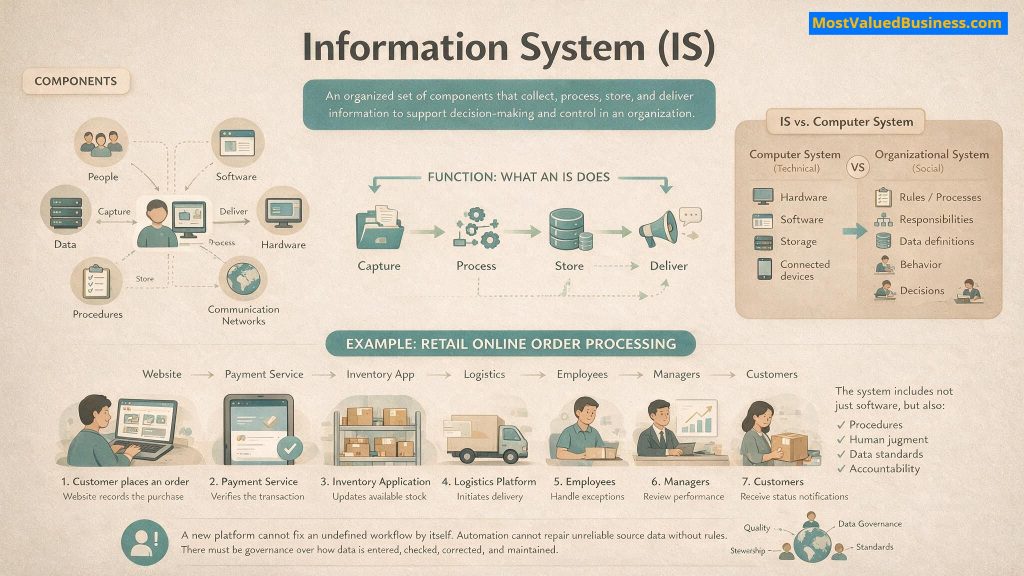
At the outset, an information system is an organized arrangement of –
- People
- Data
- Procedures
- Software
- Hardware
- Communication networks.
Basically, these elements work together to do the following:
- Capture business activity
- Transform it into meaningful information
- Deliver that information to the people or applications that need it.
Information System vs. Computer System
In general, a computer system refers mainly to technical components. These include –
- Hardware
- Operating software
- Storage
- Connected devices.
Meanwhile, an organizational system is broader. It includes –
- Approval rules
- Reporting responsibilities
- Data definitions
- User behavior
- The decisions made from the resulting output.
Example: Consider a retailer processing an online order.
- The website records the purchase
- Payment service verifies the transaction
- The inventory application updates available stock
- The logistics platform initiates delivery.
- Employees handle exceptions
- Managers review performance
- Customers receive status notifications.
Obviously, the software matters. Still, the full system also includes procedures and human judgment. Also, data standards and accountability are necessary.
That broader perspective explains why technology projects sometimes disappoint. To be honest, a new platform cannot correct an undefined workflow by itself. Nor can automation repair unreliable source data without rules. There must be governance regarding how that data is entered, checked, corrected, and maintained.
How Does Information Systems Work?
In most cases, systems follow a recurring operational cycle:
- Input
- Processing
- Storage
- Output
- Feedback.
These stages look straightforward on paper. In practice, every stage involves choices about –
- Quality
- Control
- Timing
- Ownership
- Acceptable risk.
| Stage | What Happens | Practical Business Question |
| Input | Data enters through forms, transactions, sensors, imported files, or connected applications. | Is the data complete, accurate, authorized, and collected in a consistent format? |
| Processing | Rules classify, calculate, match, validate, aggregate, or transform the records. | Do the processing rules reflect the current workflow and business policy? |
| Storage | Records are preserved in databases, document repositories, data warehouses, or cloud platforms. | Who owns the records, and how long should the organization retain them? |
| Output | The system produces reports, alerts, dashboards, documents, recommendations, or automated actions. | Does the output reach the right user at the right time and in an understandable form? |
| Feedback | Users or connected applications identify errors, exceptions, and changing requirements. | Does feedback improve the system, or does it disappear into an unresolved support queue? |
To be honest, the cycle is rarely linear. For instance, an inventory alert may trigger a purchase request. This produces a managerial approval task. Then, this result creates a supplier order.
Basically, each output becomes another process’s input. Although that interconnectedness creates speed, it also creates dependency. In fact, one inaccurate record might keep travelling.
So, a reliable system therefore needs validation at more than one point.
- Input controls prevent obvious errors.
- Processing controls identify unusual patterns.
- Output reviews help users recognize results that do not make operational sense.
However, human judgment remains important. This holds especially when exceptions carry financial, legal, or reputational consequences.
Major Players Of Information Systems
You already know that an information system is not just information technology consisting of only software and hardware. For effective functioning, an information system consists of a diverse structure that includes people and technology. The following are the major players with an information system:
- People: People include individuals who interact with the information system. These individuals enter data into the system and make use of the system’s information. Furthermore, it provides feedback to the system for its betterment. Here, people also include those IT professionals who manage and maintain the system.
- Technology: Here, technology includes information technology, as well as hardware and software. With the help of these aspects, the entire system runs properly.
- Structure: These include the roles and structure of the information system, which include established procedures and protocols. These protocols talk about processes for data collection, processing, and usage within the organization.
The Six Components of an Organizational Information System
According to an article from Carnegie Mellon University,
“The field of Information Systems involves the effective design, delivery, and use of information and communications technologies to solve problems for companies, governments, and society. Equally, it is about understanding and measuring the impacts of these technologies on people and communities so they can be deployed ethically.”
At the outset, a useful model separates the system into six connected components. In fact, none of them creates value independently.
Basically, strong software with weak procedures will produce inconsistent results. Meanwhile, competent employees working with unreliable data will spend much of their time checking, correcting, and reconciling records.
| Component | Function | Common Examples | Typical Failure Point |
| Hardware | Captures, processes, stores, transmits, or displays data. | Servers, laptops, scanners, mobile devices, sensors, and storage equipment | Outdated devices, insufficient capacity, or poor physical security |
| Software | Applies instructions and business rules to data. | Operating systems, accounting applications, CRM platforms, and analytics tools | Wrong configuration, limited integration, or excessive customization |
| Data | Represents transactions, customers, assets, employees, suppliers, or performance. | Orders, invoices, profiles, product records, and operational logs | Duplicate, incomplete, outdated, or inconsistently defined records |
| Networks | Connects users, devices, applications, and external services. | Internet connections, internal networks, cloud infrastructure, APIs, and wireless systems | Weak access controls, downtime, latency, or insecure connections |
| Processes | Define how activities should be completed and controlled. | Approval workflows, data-entry standards, escalation rules, and reporting schedules | Informal workarounds, unclear ownership, or obsolete procedures |
| People | Operate, maintain, govern, interpret, and improve the system. | Employees, managers, analysts, administrators, vendors, and customers. | Inadequate training, resistance, excessive access, or weak accountability |
What Should Businesses Do Then?
Essentially, treating people as an afterthought is a common mistake. Employees decide whether –
- Procedures are followed
- Exceptions are investigated
- Reports influence actual decisions.
When a platform is inconvenient or poorly aligned with daily work, users mostly create side systems through spreadsheets and messages. In some cases, they use personal notes.
Although those workarounds may solve an immediate problem, they fragment organizational knowledge. In fact, data gets copied rather than connected. Also, versions start competing.
Soon enough, nobody is entirely sure which version is current. Therefore, system design must reflect how work genuinely happens. They must not only decide how a process diagram says it should happen.
What Are the Different Types of Information Systems?
In general, system categories frequently overlap. For instance, a modern enterprise platform may do the following:
- Process transactions
- Generate management reports
- Support forecasting
- Surface executive dashboards from the same underlying data.
Basically, this classification clarifies the primary purpose and expected user group.
The types of information systems depend on the current and future objectives of a business. Here are some of the major types of information systems:
Operations Support Systems
These information systems work as a complementary system to certain business operations. For example, the transaction processing system of a bank is a good example of an operations support system. Basically, with this software, the service provider can analyze certain business processes. Furthermore, these systems also help in better management and control of services within a given network.
Management Information Systems
Management information systems include a combination of hardware and software integration. These integrations help an organization to perform its core functions. Hence, these systems help in the gathering of the company’s data from different online systems. These systems not only store information but also analyze and report it in a useful manner. This helps the management of the organization to make better decisions.
Decision Support Systems
With the help of decision support systems, organizations can make better decisions on their operations. In general, the focus of these decision support systems includes analyzing rapidly changing information, which one cannot determine in advance.
These decision support systems are available as automated and human-operated systems. However, there are also systems consisting of a combination of humans and computers. This helps in bringing out maximum efficiency.
Executive Information Systems
They are a type of management support system that helps make decisions at senior levels in the organization. You can also think of these systems as a higher version of a decision support system. However, the major difference that exists here is that the executive information system consists of a more graphical representation and an easy-to-understand user interface. Furthermore, this system also focuses on a broader picture.
How To Build And Manage Information Systems?
If you want to select information systems, start with the business process rather than a vendor demonstration. Essentially, product demonstrations are designed to show smooth workflows and attractive features.
Meanwhile, real operations contain –
- Missing fields
- Unusual approvals
- Delayed inputs
- Policy exceptions
- Legacy records
- People who are already stretched.
To build an information system, here are a few aspects you need to consider:
- Make sure you are aware of the needs and demands of your business. Furthermore, ensure that your business works as per your key performance indicators.
- Create a plan about how you will improve your existing system. It is highly likely that you already have an information system in place. All you need to do here is refine it.
- List your requirements for what you need more in your existing system. Then, start designing your system based on the needs of your organization.
Impact Of Information Systems In The Future
In the near future, there will be an emergence of new technologies that will heavily influence information systems:
- Artificial Intelligence and Machine learning will play a big role in automating tasks. Furthermore, they will also help in businesses’ decision-making processes.
- The Internet of Things (IoT) comprises a growing network of physical devices connected via the Internet. With this connection, there is a higher collection and sharing of data.
- Advancements in information systems are also contributing towards user-friendly and personalized services. Hence, it has become easier for businesses to anticipate the needs of their customers. As a result, they are able to provide better information and services.
Better Systems Begin With Better Organizational Decisions
Reliable information systems do not emerge from software purchases alone. Rather, they develop when an organization connects technology with disciplined processes and trustworthy data. Also, there are appropriate controls. Moreover, people understand both the system and the work it supports.
So, start with the operational problem. After that, define ownership and examine the data. Test the awkward cases, not only the smooth ones. Then, measure whether the new arrangement changes performance in a meaningful way.
In the end, a strong system makes work more visible. Also, decisions are more consistent. Moreover, responsibilities are easier to trace. Actually, a weak system merely digitizes existing confusion.
The difference usually comes down to design choices and governance. Moreover, there must be the willingness to treat implementation as organizational change rather than a one-time technical project.
Click Below For More Informative Articles!!
tags
Soumava Goswami
Soumava Goswami is a Content Strategist with 7+ years of experience in creating and strategizing helpful and user-focused content across business, marketing, leadership, and finance. With a strong background in literature and philosophy, Soumava uses memorable characters, narratives, and timeless ideas to make complex corporate concepts easier to understand. Inspired by The Social Network and shaped by his experience with a small MarTech company, he enjoys studying successful businesses. Also, he translates their strategies into practical guidance on leadership, decision-making, customer feedback, operations, and sustainable growth. LinkedIn